🌬️ Exhaust Fan Filter Maintenance
Last updated March 30, 2026
As always, please refer to the latest version of the Stardust Operational Manual for the most up to date information
If you are inspecting or replacing the exhaust fan filter, follow the steps below to keep airflow unobstructed and the filter properly installed.
📅 Step 1: Inspect the Exhaust Fan Filters Monthly
Inspect the exhaust fan filters monthly. The manual states that replacement is done most easily with the machine On and the fan running.
🔌 Step 2: Remove the Attached Hose
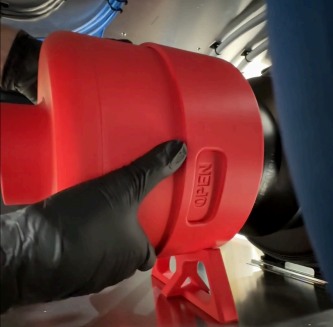
To begin replacement, remove the attached hose from the exhaust fan housing.
🔄 Step 3: Rotate the Housing to Open
Rotate the housing counterclockwise until “Open” is displayed in the viewing window.
🧼 Step 4: Expose and Replace the Filter
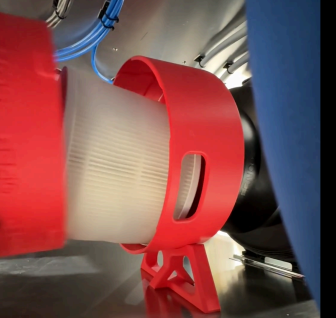
Slide the housing out to expose the filter. Install a new filter, then replace the housing.
✅ Step 5: Lock the Housing Back in Place
Turn the housing clockwise until “Closed” is displayed in the viewing window.
Was this article helpful?