🦾 Robotic Arm Is Disabled Error
Last updated March 30, 2026
If this message appears, the robotic arm was commanded to move while the workspace door was open. Close the door and restart the machine before continuing.
✅ Step 1: Close the Workspace Door
Make sure the workspace door is fully closed before trying to continue. The door sensor acts as an additional E-stop when the door is opened while the robotic arm is active.
🔁 Step 2: Restart the Machine
After the door is closed, restart the machine to continue. Do not try to resume motion without restarting. If this fault continues to occur, carefully continue to the next step
📴 Step 3: Verify the arm controller is on
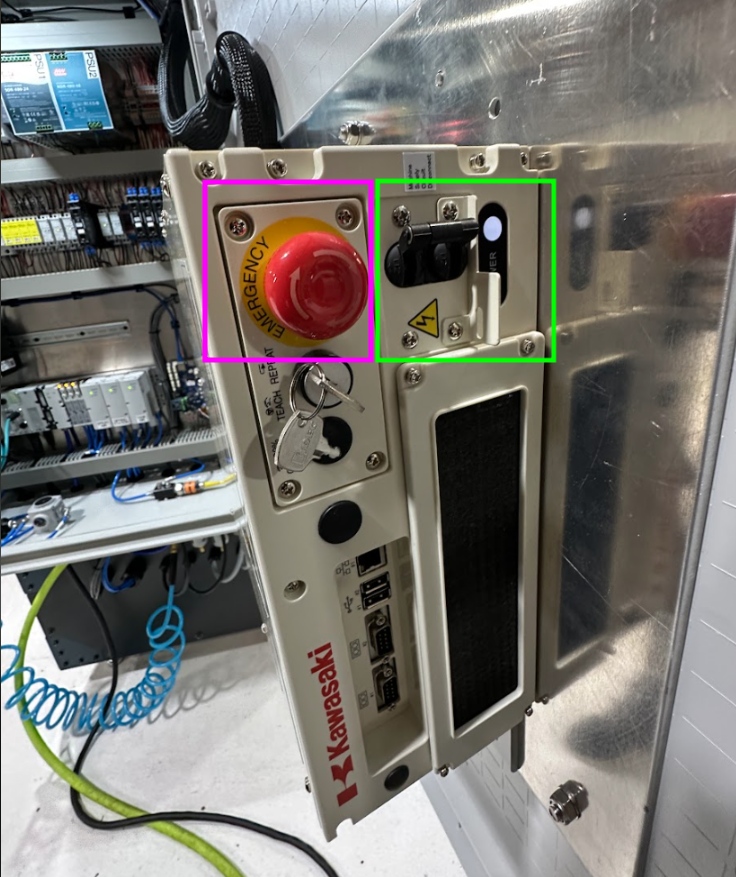
If this fault continues to occur, verify that someone did not accidentally engage the interior arm emergency stop (pink). If it is engaged, you should be able to depress it by pulling on the red button. If that is not engaged, also verify that someone did not accidentally switch the controller off (green). The correct configuration is shown in the image below.